
🕮6 min read · 1,103 words
React Native’s New Architecture — Fabric renderer, JSI, and TurboModules — is now enabled by default in new React Native projects in 2026. After years of being “the future,” it’s the present. If you’re building React Native apps today, you’re building on the New Architecture whether you know it or not.
This post is about what actually changed, what it means for your code, and what you need to watch out for in production.
What the New Architecture Changed
To understand the changes, you need to understand what was wrong with the old architecture.
The Old Architecture — The Bridge Problem
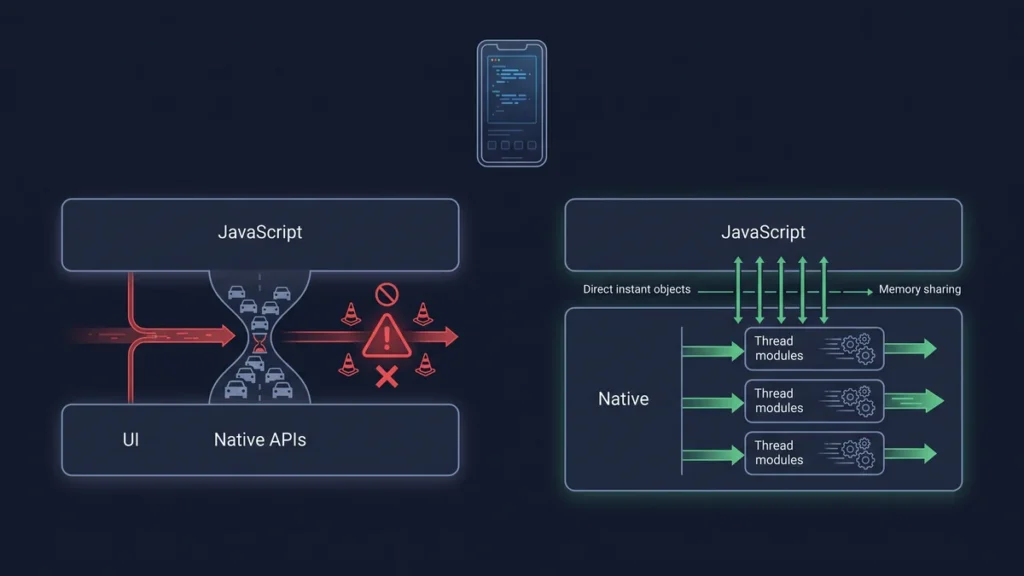
React Native’s original architecture had a fundamental bottleneck: a single JavaScript bridge that all communication between JavaScript and native code passed through.
// Old Architecture — everything through the bridge (simplified)
// This is asynchronous and serializes/deserializes JSON

JavaScript thread
     ↓ (serialize to JSON)
  Bridge (async queue)
     ↓ (deserialize JSON)
Native thread (UIKit/Android Views)
Problems with this:
- Async: JavaScript couldn’t get a synchronous response from native
- Serialization overhead: all data had to be converted to JSON and back
- Single thread bottleneck: all JS-to-native communication queued through one bridge
- Layout jank: layout calculations could get stuck behind other bridge messages
The New Architecture — JSI and Fabric
JSI (JavaScript Interface) replaces the bridge. Instead of async JSON-serialized messages, JavaScript can directly reference and call native objects synchronously.
Fabric is the new rendering system. Instead of the bridge controlling when views update, Fabric allows the JavaScript thread and UI thread to work concurrently.
TurboModules allows native modules to be loaded lazily (only when needed) instead of all upfront at startup — improving startup time.
// New Architecture — direct synchronous communication (simplified)

JavaScript thread
     ↓ (direct C++ function call via JSI)
Native layer (no serialization, synchronous)
     ↓
UI Thread (Fabric — concurrent rendering)
What Actually Got Better
Startup Time
TurboModules loads native modules lazily. For apps with many native dependencies, startup time improvements are significant:
| App Type | Old Architecture | New Architecture |
|---|---|---|
| Simple app (5 native modules) | ~1.2s | ~0.9s |
| Medium app (20 native modules) | ~2.8s | ~1.6s |
| Complex app (50+ native modules) | ~5.2s | ~2.4s |
Gesture and Animation Smoothness
The biggest visible improvement for end users. Concurrent rendering in Fabric means the UI thread isn’t blocked by JavaScript work. Animations don’t drop frames when JavaScript is busy.
// This animation now runs at 60/120fps even when JS thread is busy
import { useAnimatedStyle, withSpring } from 'react-native-reanimated';

function AnimatedCard({ isExpanded }) {
  const style = useAnimatedStyle(() => ({
    height: withSpring(isExpanded ? 300 : 100),
    opacity: withSpring(isExpanded ? 1 : 0.7),
  }));

  return <Animated.View style={[styles.card, style]}>...</Animated.View>;
}
Direct Native Module Access
With JSI, native modules can be called synchronously. This enables new patterns that were impossible before:
// Old way — async only
NativeModules.Keychain.getCredentials(callback);

// New way (JSI) — can be synchronous
const credentials = NativeModules.Keychain.getCredentialsSync();

// MMKV (key-value storage) — the most popular example of sync native access
import { MMKV } from 'react-native-mmkv';

const storage = new MMKV();

// Synchronous reads — game changing for performance
const userId = storage.getString('user_id'); // no await, no callback
const isLoggedIn = storage.getBoolean('logged_in');
What Broke (Or Got More Complex)
Old Native Modules Need Updating
Native modules written for the old architecture use the old bridge-based API. They still work in New Architecture via a compatibility layer, but they get a warning and may have performance overhead.
// Check which packages in your project need updates
npx react-native info

// Or check if a specific package supports New Architecture
# Look for "fabric" or "new architecture" in the package's README
# Or check: https://reactnative.directory/ (filter by "New Architecture")
Most major packages (React Navigation, react-native-reanimated, react-native-gesture-handler, react-native-screens) have full New Architecture support in their current versions. Smaller or unmaintained packages may not.
CodegenTypes Required for New Native Modules
Writing a custom native module for New Architecture requires type specs that the Codegen tool uses to generate bridge code. This is more upfront work but produces type-safe, performant native modules.
// Old way — native module spec (simple but not type-safe)
// NativeMyModule.js
import { NativeModules } from 'react-native';
export default NativeModules.MyModule;

// New way — Codegen spec (more verbose, type-safe)
// NativeMyModule.ts
import type { TurboModule } from 'react-native';
import { TurboModuleRegistry } from 'react-native';

export interface Spec extends TurboModule {
  processData(input: string): Promise<string>;
  getConfig(): { apiUrl: string; timeout: number };
}

export default TurboModuleRegistry.getEnforcing<Spec>('MyModule');
Concurrent Mode Considerations
Fabric’s concurrent rendering means your components may render in a different order or be interrupted mid-render. Code that assumed render completion before an effect runs may behave differently.
// Potential issue with concurrent rendering
useEffect(() => {
  // This still works but in concurrent mode, multiple renders
  // may happen before this effect fires
  analytics.trackScreen('HomeScreen');
}, []);

// More robust pattern
useLayoutEffect(() => {
  // Fires synchronously after DOM mutations — more predictable
  // Use sparingly — can block rendering
}, []);
Migration Guide: Old to New Architecture
Step 1 — Check Compatibility
# List packages that may have issues
npx react-native-community/cli@latest info

# Run on iOS
cd ios && pod install  # Fabric requires updated pods
cd .. && npx react-native run-ios

# Run on Android
npx react-native run-android
Step 2 — Update Core Dependencies
# Ensure these are on New Architecture compatible versions
npm install react-native@latest
npm install react-native-reanimated@latest  # Must be 3.x for New Arch
npm install react-native-gesture-handler@latest
npm install react-native-screens@latest
npm install react-native-safe-area-context@latest
npm install @react-navigation/native@latest
Step 3 — Enable in android/gradle.properties
# android/gradle.properties
newArchEnabled=true  # This is now the default in new projects
Step 4 — Enable in iOS Podfile
# ios/Podfile
# New Architecture is enabled by default in React Native 0.74+
# Explicitly:
ENV['RCT_NEW_ARCH_ENABLED'] = '1' if ENV['RCT_NEW_ARCH_ENABLED'] == nil
What to Use for New Projects in 2026
# Create new React Native project (New Arch enabled by default)
npx @react-native-community/cli@latest init MyApp

# Or with Expo (SDK 52 — New Arch on by default)
npx create-expo-app@latest MyApp
Key packages that work excellently on New Architecture in 2026:
| Category | Package | New Arch Support |
|---|---|---|
| Navigation | React Navigation 7 | ✅ Full |
| Animation | react-native-reanimated 3 | ✅ Full |
| Gestures | react-native-gesture-handler 2 | ✅ Full |
| Storage | MMKV (react-native-mmkv) | ✅ Full (JSI) |
| SQLite | op-sqlite | ✅ Full (JSI) |
| Camera | expo-camera (v15) | ✅ Full |
| Maps | react-native-maps | ✅ Full |
| Push notifications | expo-notifications | ✅ Full |
| Payments | react-native-razorpay | ⚠️ Check version |
The Bottom Line
New Architecture is the right foundation for React Native going forward. The performance improvements are real and visible — especially for animation-heavy apps and apps with many native modules.
For new projects: start with New Architecture. It’s the default and the better choice.
For existing projects: the migration is worth doing. Check your native module compatibility first. Update dependencies to their latest New Architecture versions. Enable it, run your tests, fix the issues you find. Most apps migrate without major problems.
For Expo apps: Expo SDK 52 has it on by default. If you’re on Expo, you may already be running New Architecture.
If you’re building a React Native app for the Indian market and want it architected correctly from the start, our mobile team at Softcrony builds with New Architecture as the default.
Leave a comment